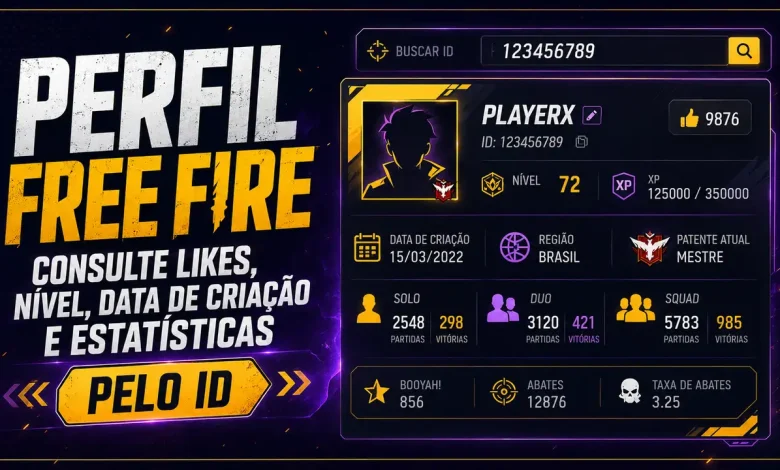
Want to check a Free Fire account without adding the player or opening the game? With the Free Fire Profile by ID tool, you can search for an account using its numeric player ID and open an organized page with level, likes, account creation date, match statistics, ranks, guild information, and equipped items.
The lookup works for your own account, friends, content creators, and other players. No password, email address, or login code is required.
Search for a Free Fire profile by ID
Enter the numeric player ID below. The profile page will open in the current website language and can be shared normally.
Enter only the numeric account ID to open the full player profile.
Most viewed player profiles
Discover the accounts receiving the most visits on the website. This list uses stored profile data and does not make new API requests.


Recently generated profiles
Browse the latest accounts searched on the site. This section updates automatically as new player profiles are created.


What can you find in the profile?
The result brings the main public account data together on one page. Instead of browsing several game screens, you get a clear summary and can explore each section at your own pace.
- nickname, player ID, region, and level;
- experience, likes, and account creation date;
- last online information and update date;
- Battle Royale and Clash Squad ranks;
- guild, signature, team, and additional account data;
- Solo, Duo, and Squad statistics;
- equipped skins and items recognized by the Wiki.
Match statistics in an easy-to-read format
One of the most useful areas is the performance section. It separates Solo, Duo, and Squad results, making it easier to compare each mode. Depending on the available data, the profile may show matches, wins, kills, deaths, damage, revives, headshot kills, survival time, distance travelled, and other statistics.
This makes it easier to understand where a player performs best. An account may have more wins in Squad, for example, while maintaining a stronger kill rate in Solo.
Account creation date, likes, level, and region
The main card highlights the information players search for most often. You can identify the account by nickname and ID, check its region, current level, number of likes, and account creation date when that information is available.
Because Free Fire nicknames may contain special characters, the numeric ID remains the safest way to find the correct account.
Equipped skins and items
Recognized equipped items appear in clean cards with an image and name. Selecting an item opens its Free Fire Wiki page for more details. Items that have not yet been catalogued are hidden to keep the section organized.
How are the profile details updated?
After the first lookup, the profile is cached so it can load faster and avoid repeated requests. While the cache is valid, the page displays the stored data. Once the configured period expires, an Update profile button may become available.
Future updates use the region already saved for that account, reducing unnecessary attempts and speeding up the process.
Is the profile lookup safe?
Yes. The tool uses only the public player ID and displays information returned by the API. It does not log into the account, modify anything, or request a password, email address, or verification code.
Frequently asked questions
Can I check any player?
You can search for any valid account available in the regions supported by the tool.
Why are some details missing?
Not every account returns the same fields. Availability depends on the region, the API response, and the public data associated with the player.
Is the profile refreshed every time the page is opened?
No. Updates are manual and become available only after the cache expires. This keeps the page fast and prevents repeated requests.
Check a player profile now
Use the search field at the beginning of the article to open the complete profile page. You can then compare levels, likes, wins, kills, ranks, and equipped items with your friends.